Icon of program: iClock

iClock for Mac

  • Trial version
  • 2.7
    11
  • 5.6K
  • V5.8.7

Simple and intuitive clock for personal computers

iClock Pro is a user-friendly clock specifically designed to be used with Mac computers. While the interface is quite simple, the fact of the matter is that this tiny bundle offers numerous customizable options. Each can be adjusted at the click of a button and this clock can be an ideal addition for those who have been looking for a more robust way to keep track of time. It can be used within both business and home-based settings.

Top Recommended Alternative

Main Features and Functionality

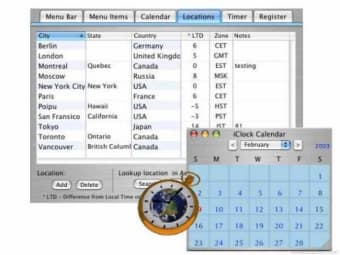
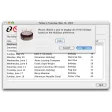
The iClock Pro offers several interesting features which are not present within standard computer-based clocks. It is equipped with an alarm that can be set to activate an alert when it is a specific time at a certain part of the world. This can be very useful for those who may need to make an international business call. Floating world clocks are likewise available and the user can choose the country which is displayed.

Other Functions

Besides featuring international alerts, the iClock Pro provides a built-in calendar which can be extremely useful to plan upcoming events. Other options include choosing single-phase or analog settings, adjusting fonts and colors, customizing the location of the menu and an ability to view all running applications with a single click.

Changes

* [Fixed] Floating clocks digital layout issue (some font changes to 14 point when things don't fit). * [Fixed] stock editing issue. * [Update] to copyright. * [Update] to forum URL to Plum Amazing site. * [Update] Purchase URL in Reg . Dialog changed to PlumAmazing.com * [Fixed] Minor layout cleanup for some prefs. * [Fixed] Custom Alarm now restores selected Sound correctly. * [Update] Custom Alarm to play Sound button and only play sound when selecting if option key down.


  • Pros

    • This is a very user-friendly and intuitive desktop clock
    • Numerous advanced features are immediately available to the user
  • Cons

    • There is no free version of this software package
    • There is (currently) no clock which is intended to support Windows operating systems
 0/1

App specs

  • License

    Trial version

  • Version

    5.8.7
  • Latest update

  • Platform

    Mac

  • OS

    Mac OS X

  • Language

    English

  • Downloads

    5.6K

    Last month's downloads

    • 2
  • Size

    132.11 MB

  • Developer

Program available in other languages


Icon of program: iClock

iClock for Mac

  • Trial version
  • 2.7
    11
  • 5.6K
  • V5.8.7

User reviews about iClock

Have you tried iClock? Be the first to leave your opinion!

Add review

You may also like

Alternatives to iClock

Explore Apps

Latest articles

Laws concerning the use of this software vary from country to country. We do not encourage or condone the use of this program if it is in violation of these laws.
Softonic

Is iClock safe?

100/100

Score result: Clean

This file passed a comprehensive security scan using VirusTotal technology. It is safe to download.

  • Virus free
  • Spyware free
  • Malware free
  • Verified by Security Partners

    VirusTotal logo

Scan Info

Last scan
Wednesday, December 13, 2023
Scan provider
VirusTotal · Full report

File Integrity

File
iclock.zip
SHA256
4e77cdf4ddf81e29bfa8c89d41054fe8b4d74f3a74a1e7e45a2076588288a0e6
SHA1
6a149ac2c58637f521612fe25820392983ed2aec

Softonic security commitment

iClock has been thoroughly scanned by our advanced security systems and verified by industry-leading partners. This file comes from the official developer and has passed all our security checks, showing no signs of viruses, malware, or spyware. For more information, visit our Security and Trust Center